
Attendance Management System in PHP and MySQL

We will create a table for store the attendance records.
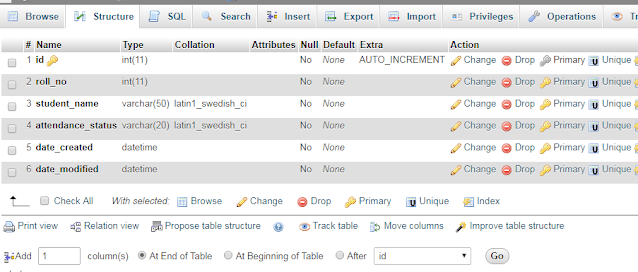
Now we are going to change in some fields of form.
We will convert all field in array format because name will be same of fields and value will be change and at a single time we are going to insert multiple record.
Now our HTML will look like this:
<form action="" method="post"><table><tbody>
<tr><td>S.I</td><td>Roll No</td><td>Student Name</td><td>Attendance</td></tr>
<tr><td>1</td><td>123<input type="hidden" name="roll_no[]" value="123" /></td><td>Raj Shekhar<input type="hidden" name="student_name[]" value="Raj Shekhar" /></td><td><label for="present0"><input type="radio" id="present0" name="attendance_status[0]" value="Present"> Present</label><label for="absent0"><input type="radio" id="absent0" name="attendance_status[0]" value="Absent"> Absent</label></td></tr>
<tr><td>2</td><td>231<input type="hidden" name="roll_no[]" value="231" /></td><td>Pankaj Kumar</td><td><label for="present1"> <input type="radio" id="present1" name="attendance_status[1]" value="Present"> Present</label><label for="absent1"> <input type="radio" id="absent1" name="attendance_status[1]" value="Absent"> Absent</label></td></tr>
<tr><td>3</td><td>345<input type="hidden" name="roll_no[]" value="345" /></td><td>Amit Singh<input type="hidden" name="student_name[]" value="Amit Singh" /></td><td><label for="present2"><input type="radio" id="present2" name="attendance_status[2]" value="Present"> Present</label><label for="absent2"><input type="radio" id="absent2" name="attendance_status[2]" value="Absent"> Absent</label></td></tr><tr><td>4</td><td>456<input type="hidden" name="roll_no[]" value="456" /></td><td> Arjun Kumar<input type="hidden" name="student_name[]" value="Arjun Kumar" /></td><td><label for="present3"><input type="radio"id="present3"name="attendance_status[3]"value="Present">Present</label><label for="absent3"><input type="radio"id="absent3"name="attendance_status[3]"value="Absent">Absent</label></td></tr><tr><td>5</td><td>567<input type="hidden" name="roll_no[]" value="567" /></td><td>Amit Kumar<input type="hidden" name="student_name[]" value="Amit Kumar" /></td><td><label for="present4"><input type="radio"id="present4"name="attendance_status[4]"value="Present">Present</label><label for="absent4"><input type="radio"id="absent4"name="attendance_status[4]"value="Absent">Absent</label></td></tr><tr><td>6</td><td>789<input type="hidden" name="roll_no[]" value="789" /></td><td>Suraj Tiwari<input type="hidden" name="student_name[]" value="Suraj Tiwari" /></td><td><label for="present5"><input type="radio"id="present5"name="attendance_status[5]"value="Present">Present</label><label for="absent5"><input type="radio"id="absent5"name="attendance_status[5]"value="Absent">Absent</label></td></tr> </tbody></table> <br/><input type="submit" name="submit" value="Mark Attendance" /></form>I have create a static table. You can create a dynamic table and where I put number you can execute a counter in while or for loop.
And now we will write a code for insert the data.
if(isset($_POST['submit'])){ foreach ($_POST['attendance_status'] as $id => $attendance_status) { $roll_no = $_POST['roll_no'][$id]; $student_name = $_POST['student_name'][$id]; $date_created = date('Y-m-d H:i:s'); $date_modified = date('Y-m-d H:i:s'); $attendance = $conn->prepare("INSERT INTO attendance
(roll_no, student_name, date_created, date_modified, attendance_status) VALUES (?, ?, ?, ?, ?)"); $attendance->bind_param("issss", $roll_no, $student_name, $date_created, $date_modified, $attendance_status); $attendance->execute(); } if ($conn->affected_rows==1) { $msg = "Attendance has been added successfully"; }}We can see the data has been successfully inserted


0 Comments